
Chapter 6 · 6.2
The product page for your hosting package
Watch it in a short video
In My Products, click Admin or the name of a package. This takes you to the product page. Here you'll find all the details of that package and everything you can change yourself.
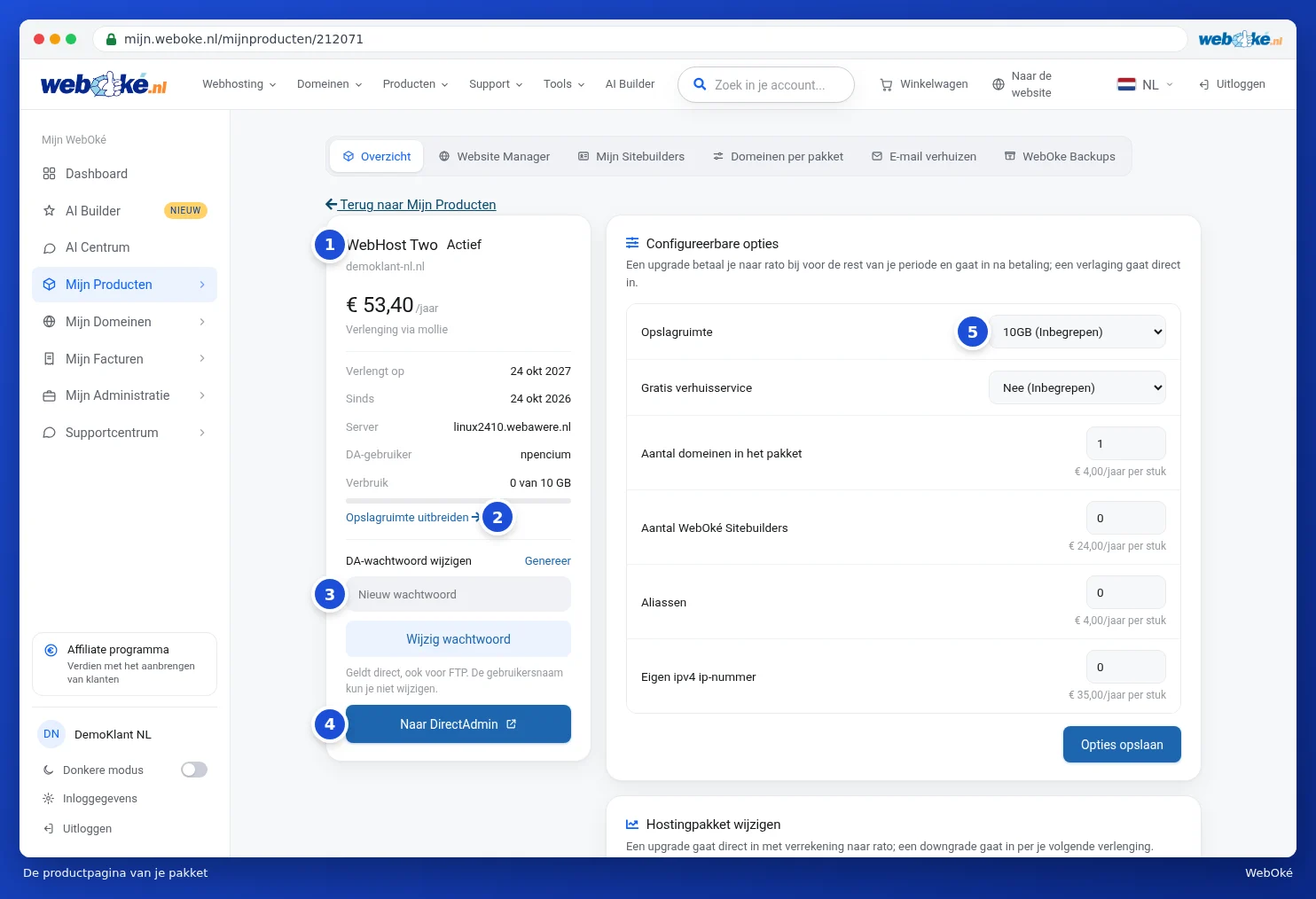
The left card: your package at a glance
- At the top, you'll see the package name, the status and the domain name (1). Click the domain name to open your website.
- Below that, you'll see the cost per period, how it's renewed, the date of the next renewal, since when you've had it, the server and your DA user. Under Usage, you'll see how much of your storage is in use. Use Expand storage (2) to make your package bigger, see Expanding storage.
- Under Change DA password (3), you set a new password for DirectAdmin. Type a password or click Generate, then click Change password. The new password applies immediately, including for FTP. You can't change your username.
- Use Go to DirectAdmin (4) to open your package's control panel, without having to log in. See Go to DirectAdmin.
The cards on the right
- Configurable options (5): extra storage, extra domains, aliases, an own IP address and more. See Changing options and extra IP addresses.
- Change hosting package: switch to a larger or smaller package. See Changing your package (upgrade or downgrade). On the same card, you can convert your package to an email package, see Converting your hosting package to an email package.
- MCP server for AI: connect your own AI to the files of this package. See MCP server: connecting your own AI to your package.
- Cancel product and Transfer to another customer. See Cancelling, undoing cancellation, or transferring a product.
- Set up email: a check of the DNS records required for your mail. See The Set up email card (MX, SPF, DKIM, DMARC).

If your package has an own IP address, you'll also see an Own IP addresses card. If you have an email package, you'll also see the digital business card, see The digital business card (email package).
Tip: most things you set up in your package yourself, such as mailboxes, databases, FTP accounts and SSL, are managed in DirectAdmin. We have a separate guide for that: the DirectAdmin guide.