
Chapter 6 · 6.4
Always redirect visitors to https
Even with a certificate, a visitor can still open your site via http://, without the padlock. So redirect everyone automatically to https. Only do this once the certificate works: first open https://yourdomain.com and https://www.yourdomain.com yourself and check the padlock.
Force SSL with https redirect
- Under Account Manager, click Domains and then on your domain name.
- Check that Secure SSL (1) is switched on. Only then will you see the options below.
- Under SSL, switch on Force SSL with https redirect (2).
- Click SAVE (4).
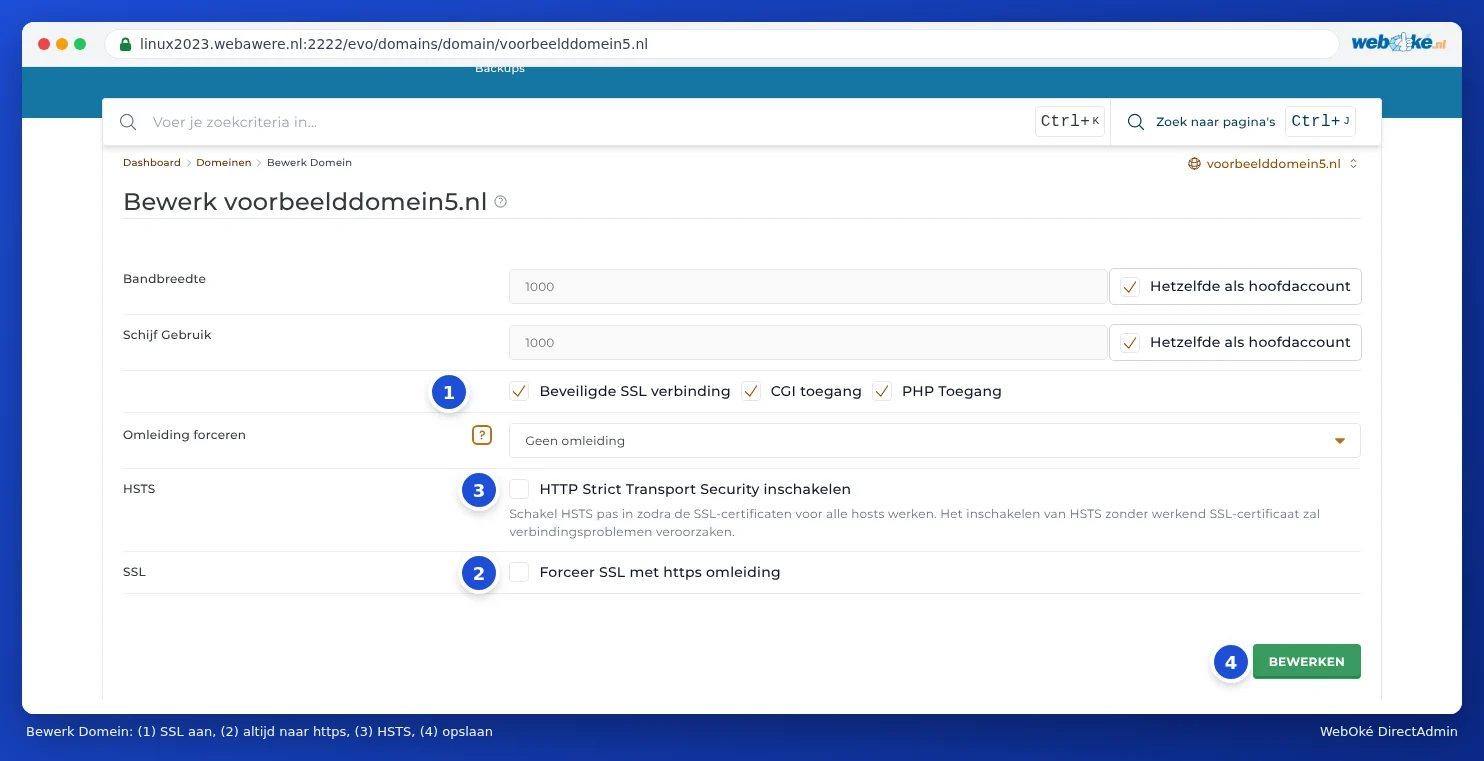
From now on, anyone who opens http://yourdomain.com will automatically be sent to https://yourdomain.com.
HSTS
Above that is HSTS, with the Enable HTTP strict transport security switch (3). This tells browsers: from now on, only open me via https. This is slightly safer than a simple redirect.
Please note: DirectAdmin says it itself: only enable HSTS once the certificates for all names are working. Browsers remember HSTS for a long time. If the certificate stops working later, visitors may not be able to open your site at all, not even via http. If in doubt, leave HSTS off.
Or with .htaccess or your website itself
You can also redirect using a rule in .htaccess, or with a setting or plugin in your website. Use only one method. Two redirects at the same time (for example Force SSL and also a rule in .htaccess that works differently) can sometimes create a loop: the browser will then report that the page isn't redirecting properly.
In WordPress, under Settings, General, set both addresses to https://. This is needed for a padlock without warnings (see No padlock or 'not secure': fixing mixed content).
Frequently asked questions
Force SSL is switched on, but I still end up on the unsecured site
- Your browser may still remember the old page. Try a private window.
- Is there a .htaccess file in public_html with its own rules that redirect first, for example from a caching plugin? These sometimes take priority. Put the https rule at the top of .htaccess, or let the plugin redirect to https instead.
- Does your site come in through a pointer or subdomain? Then switch on https there as well, and make sure that name is included in the certificate.
After switching it on, I get 'too many redirects'
This means two settings are sending each other back and forth, for example Force SSL and a plugin, or the Cloudflare proxy with the SSL mode set to Flexible. Switch off one of the two. If you use Cloudflare, choose the SSL mode Full (strict) instead.